Personal
Automating Accessibility Monitoring for My Portfolio with n8n
I wanted to go beyond manually checking my portfolio for accessibility issues, so I built an n8n workflow that automatically monitors my website using automated accessibility testing. With the help of AI, I explored connecting web requests, accessibility checks, and notifications into a workflow that can help me catch issues earlier.
After spending time testing and improving my portfolio manually, I started thinking about something:
What if my portfolio could check itself?
Accessibility is something I don't want to think about only when I'm actively working on the website.
As I continue adding features and changing components, there's always a possibility that a new change could introduce an accessibility issue.
So I decided to experiment with n8n and build a small automated accessibility testing workflow for my portfolio.
This became one of my first opportunities to combine QA, automation, accessibility, APIs, and AI-assisted development into one project.
What I Wanted to Build
The idea was to create a workflow that could:
The overall workflow became:
Manual Trigger
      ↓
HTTP Request
      ↓
Accessibility Scanner
      ↓
/a11y-test
      ↓
Process Results
      ↓
Violations Found?
      ↓
Create GitHub Issue
Instead of manually checking the test page and documenting every issue myself, I wanted the workflow to turn detected accessibility problems into actionable QA issues.
Why n8n?
I've been exploring n8n because of its potential for connecting different tools and automating repetitive processes.
For this project, I wanted to see if I could use it for something practical rather than simply building a generic workflow.
Accessibility testing seemed like a good use case because it involves a predictable process:
Trigger → Check → Analyze → Report
That made it something that could potentially be automated.
Building the Workflow
I started by breaking the process into smaller steps.
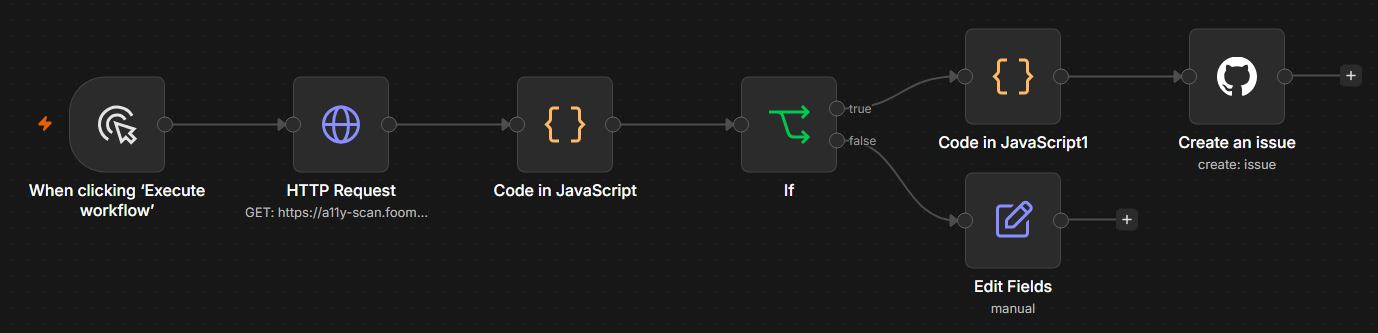
Step 1 — Manual Trigger
For this experiment, I decided to use a manual trigger.
This allows me to start the accessibility check whenever I want while I'm developing and testing the workflow.
It also made debugging easier because I could run the workflow repeatedly while making changes.
Step 2 — HTTP Request
The next step uses an HTTP Request node to communicate with my accessibility scanning service.
The workflow sends a request to:
https://a11y-scan.foomworks.workers.dev/scanThe scanner is responsible for performing the accessibility check against my test page.
The target page is:
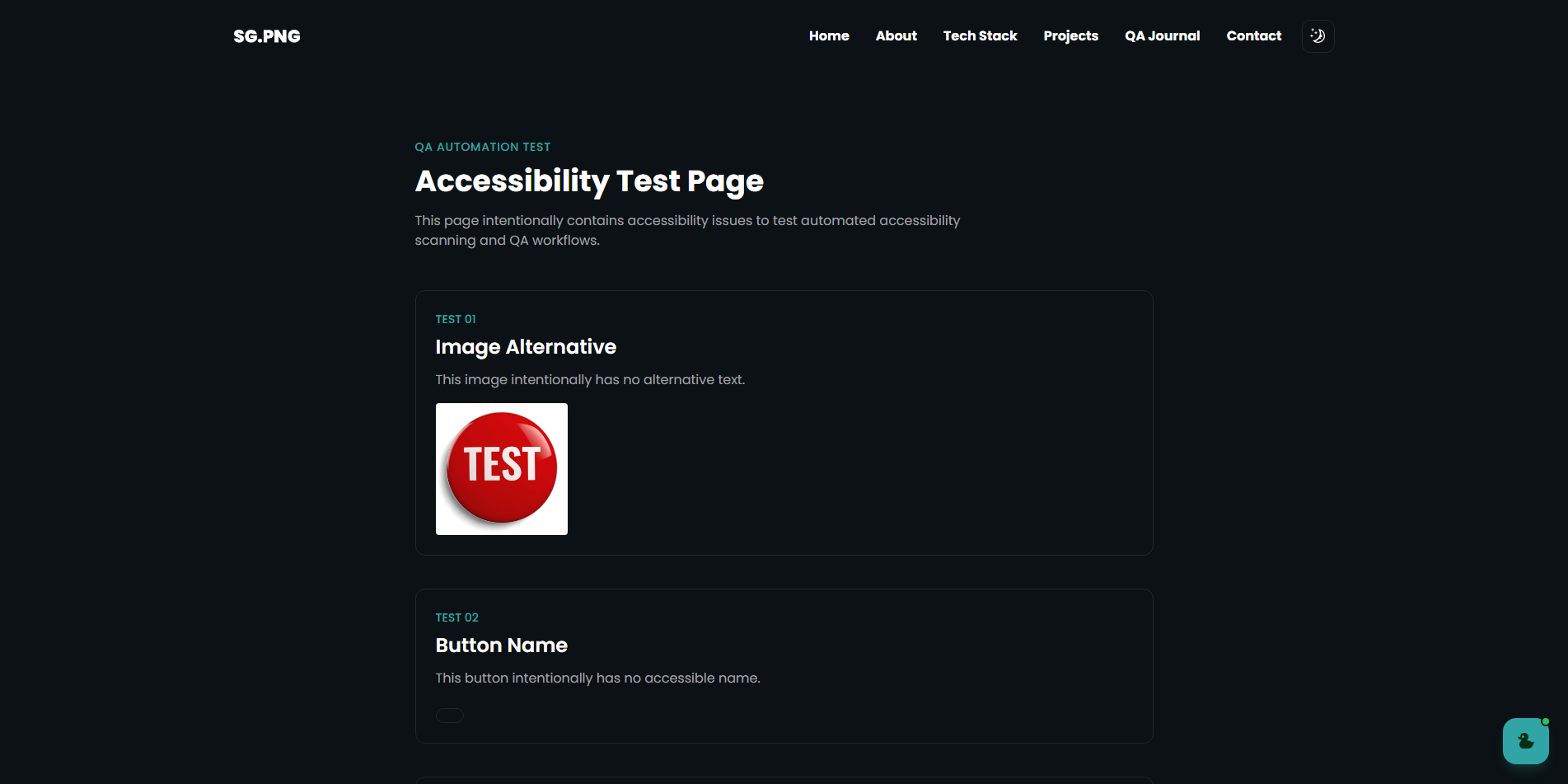
https://patriciasugapong.vercel.app/a11y-testI created the /a11y-test page specifically as a testing environment where accessibility issues can be intentionally introduced and detected.
This gives me a controlled system under test instead of relying only on the production portfolio.
Step 3 — Run Accessibility Testing
The accessibility scanner checks the test page for potential accessibility violations.
The checks can identify issues such as:
The goal isn't to assume that automated testing can find everything.
Instead, it's another automated layer that can help identify common accessibility issues and turn them into something I can investigate.
Turning Results Into Something Useful
One thing I realized while building the workflow is that detecting an accessibility violation isn't enough.
A raw automated result can contain a lot of technical information.
What I actually need as a QA is something actionable.
The workflow therefore processes the scan results and checks whether accessibility issues were found.
The idea is:
Accessibility Scan
       ↓
Results Returned
       ↓
Are There Violations?
       ↓
      Yes
       ↓
Create GitHub Issue
This turns an automated scan into a more practical QA workflow.
Automatically Creating GitHub Issues
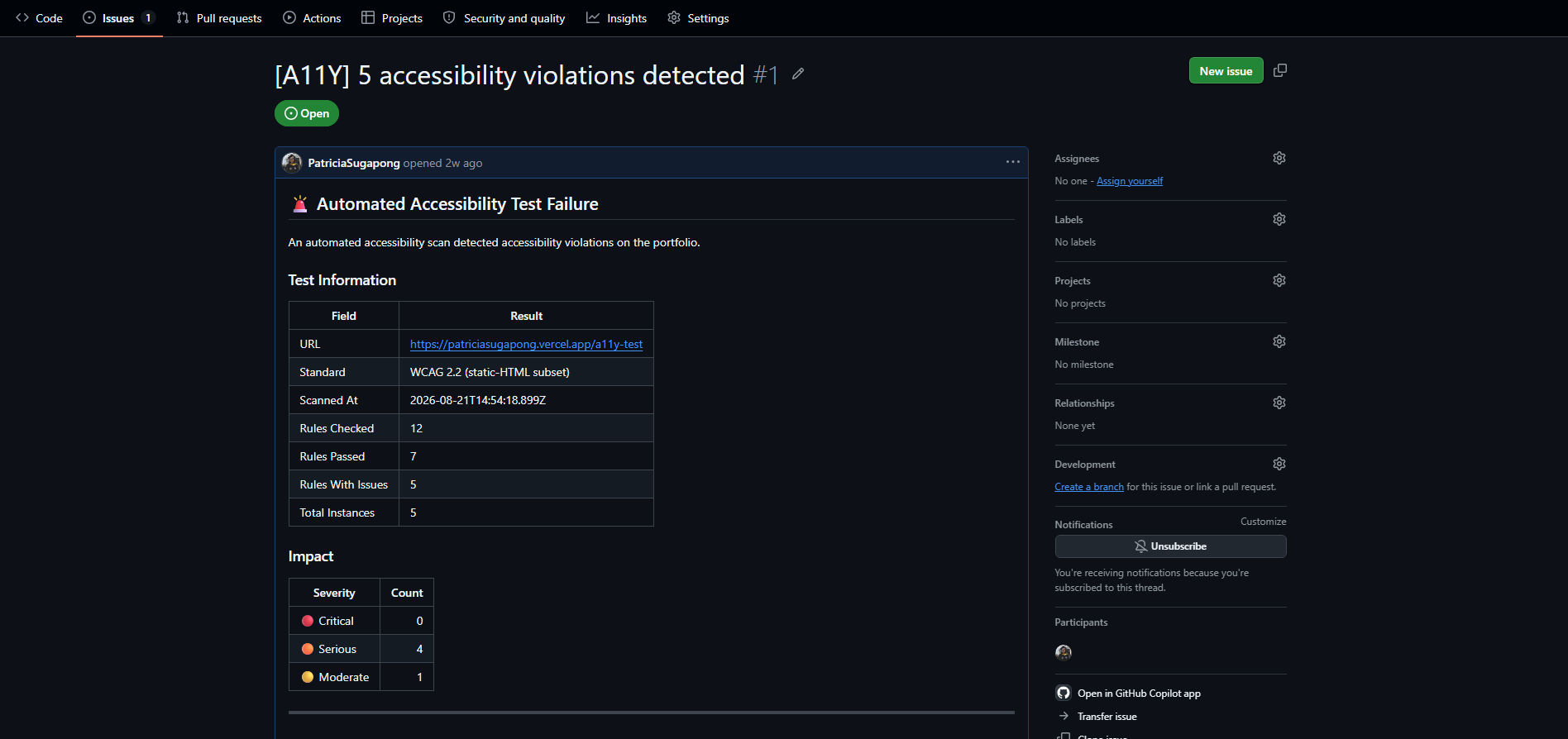
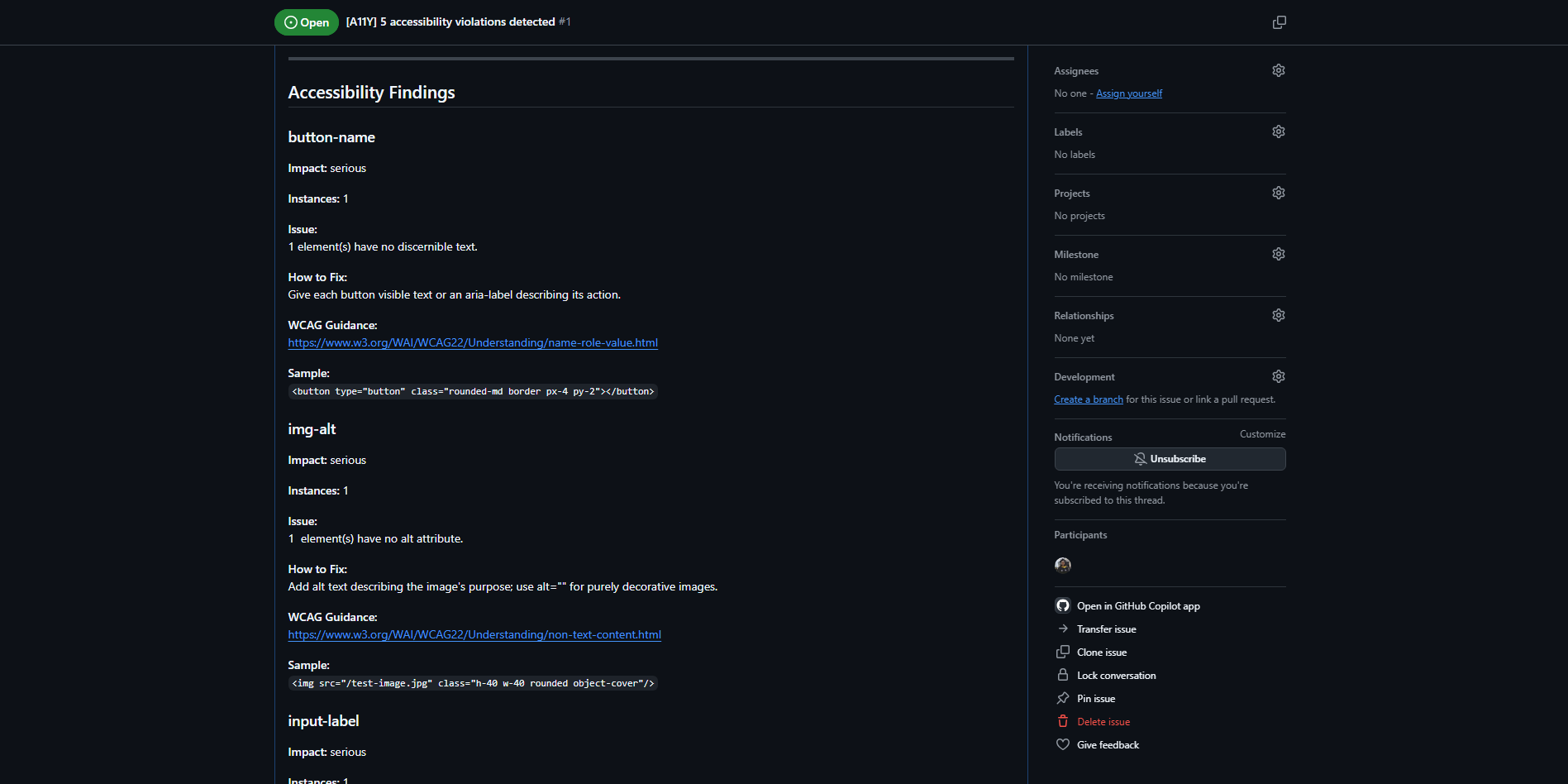
If the accessibility scan detects violations, the workflow creates an Issue in my GitHub repository.
This is useful because the accessibility problem doesn't simply disappear into a scan result.
Instead, it becomes a trackable item that I can investigate and fix.
For example:
Accessibility Violation Detected
            ↓
       n8n processes result
            ↓
       GitHub Issue created
            ↓
       Investigate the issue
            ↓
          Fix it
            ↓
       Test again
This creates a simple feedback loop between automated testing and issue tracking.
Using AI During Development
AI was also part of the development process.
I used it to help me understand how the different pieces of the workflow could fit together, particularly when working with n8n nodes, HTTP requests, expressions, and processing the accessibility results.
It helped me:
This was particularly useful because I was still getting comfortable with n8n.
Instead of spending a long time trying to figure out an unfamiliar configuration from scratch, I could use AI to explore possible approaches and then test whether they actually worked.
Testing the Automation
I also had to test the workflow itself.
That meant checking:
This introduced another interesting layer.
I'm not only testing the portfolio.
I'm testing the automation that tests the portfolio.
What I Learned
Accessibility testing can be automated, but shouldn't be the only layer
Automated tools are useful for catching common accessibility issues, but they don't replace manual testing.
Keyboard testing, screen reader testing, and understanding the actual user experience are still important.
Automation requires thinking about failures
It's easy to build the happy path:
Trigger → Scan → Issue CreatedBut a useful QA workflow also needs to consider:
No violations
Multiple violations
Scanner failure
Invalid response
Website unavailable
Unexpected data
GitHub Issue creation failure
Thinking about these scenarios helped me approach the workflow from a QA perspective rather than simply trying to make the automation work.
n8n can be useful for QA workflows
This project helped me see n8n beyond general workflow automation.
It can potentially connect different parts of a QA process:
Test
 ↓
Process
 ↓
Analyze
 ↓
Report
 ↓
Track
In this case, the final step is automatically creating a GitHub Issue when an accessibility problem is detected.
AI helped me learn faster
AI was especially useful when I encountered unfamiliar n8n configurations or needed help understanding how to connect different pieces of the workflow.
But I still had to test the workflow myself and verify that the automation actually behaved as expected.
Final Thoughts
This project started with a simple question:
"Can I automate accessibility checks for my own portfolio?"
It turned into an opportunity to explore how automation could become part of my QA workflow.
The final workflow is intentionally simple:
Manual Trigger
      ↓
HTTP Request
      ↓
Accessibility Scanner
      ↓
Portfolio Test Page
      ↓
Process Results
      ↓
GitHub Issue
It's still a small experiment, but it's one of the projects that made me more interested in combining QA + automation + accessibility + APIs + AI.
And honestly, using my own portfolio as the system under test makes it even more useful.
If I introduce an accessibility issue, I can detect it.
If the automation catches it, I can investigate it.
And if the workflow itself breaks?
Well... I get another thing to test.
⚠️ Note: This automation is currently inactive because the n8n Cloud trial has ended. The workflow remains part of the project but is not actively running.