Learning
Building an AI Chatbot for My QA Portfolio with n8n
I wanted my portfolio to be more interactive than a collection of pages and project cards, so I built an AI-powered chatbot that can answer questions about my experience, projects, skills, and QA work. Using n8n, webhooks, and Gemini, I explored how AI could be integrated into a real portfolio while thinking about reliability, data accuracy, and user experience.
⚠️ Chatbot Status: The portfolio chatbot is currently hidden while the n8n Cloud workflow is unavailable following the end of its trial period. The chatbot and its workflow remain part of the project and may be re-enabled in the future.
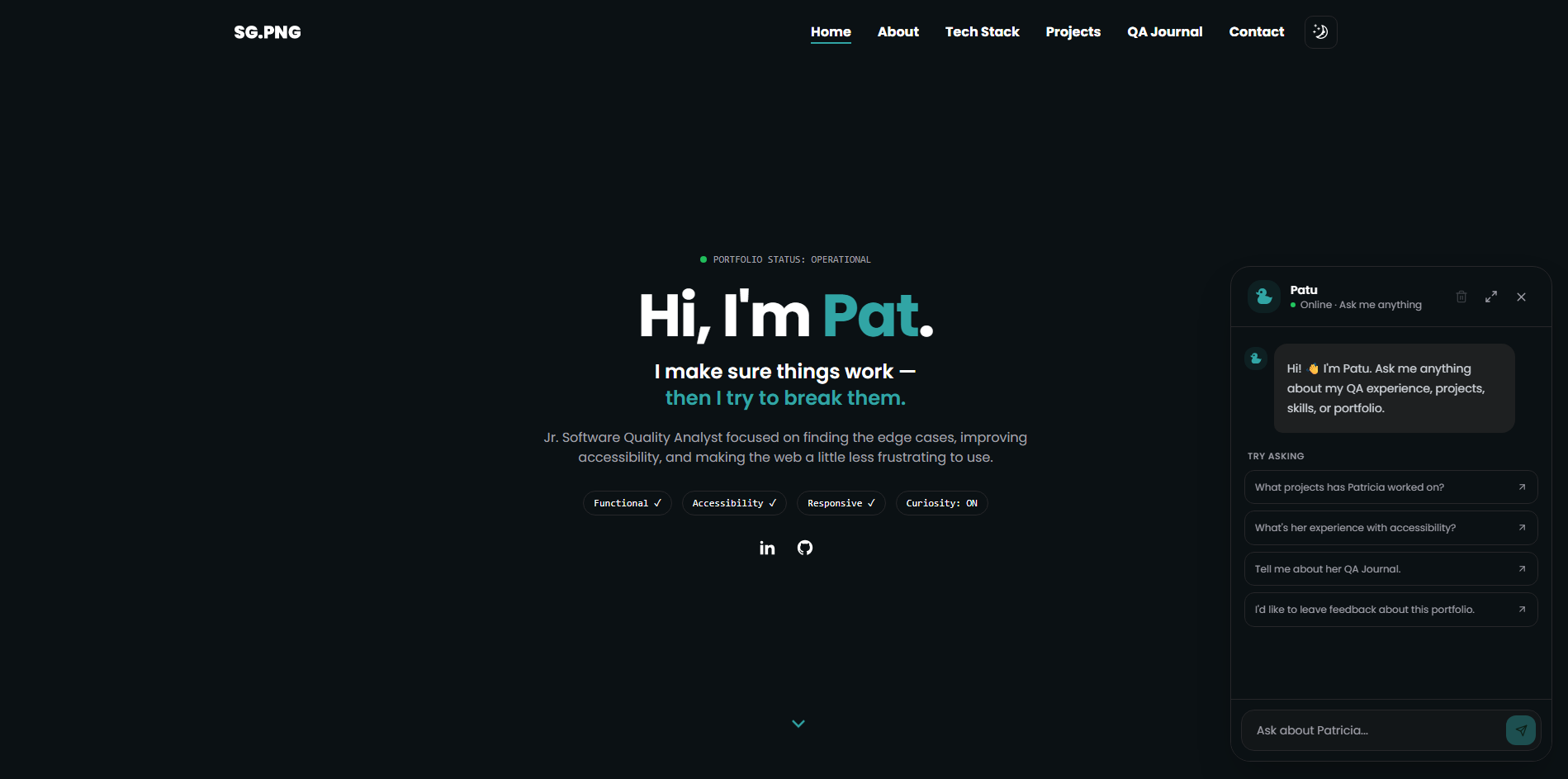
After building different parts of my portfolio, I started thinking about how visitors actually interact with it.
They can browse my projects.
They can read my QA Journal.
They can look through my skills and experience.
But the experience is still mostly:
Click → Read → Navigate → Read again.
I wanted to experiment with something more interactive.
So I decided to build an AI chatbot directly into my portfolio.
The idea was simple:
What if visitors could just ask my portfolio a question?
Instead of searching through different sections, they could ask things like:
"What QA projects has she worked on?"
"Does she have experience with accessibility testing?"
"What tools does she use?"
"Tell me about her QA Journal."
That became my next n8n project.
What I Wanted to Build
I wanted the chatbot to understand the actual content of my portfolio rather than respond with generic AI answers.
The basic architecture became:
Visitor
   ↓
Portfolio Chatbot
   ↓
Next.js API
   ↓
n8n Webhook
   ↓
AI Agent
   ↓
Portfolio Context
   ↓
Gemini
   ↓
Response
   ↓
Chatbot
The goal was to make the chatbot feel like an extension of my portfolio.
Building the Chat Interface
I started with the frontend.
The chatbot needed to be easy to access without getting in the way of the rest of the website.
I built a floating chat button that opens the conversation interface.
From there, visitors can:
I also had to think about smaller details that are easy to overlook:
These became small frontend QA considerations while I was developing the feature.
Connecting the Chatbot to n8n
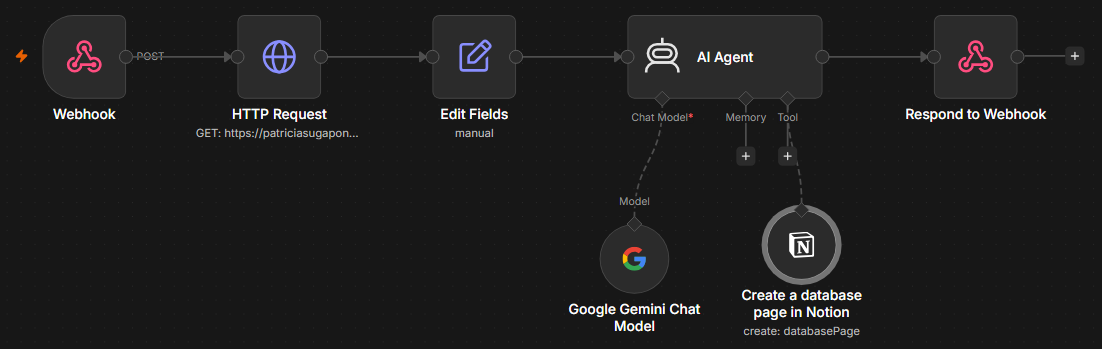
Instead of putting the AI logic directly into my Next.js application, I decided to use n8n as the backend workflow.
The portfolio sends the user's message to an n8n webhook.
Conceptually:
User Question
      ↓
Next.js
      ↓
Webhook
      ↓
n8n Workflow
      ↓
AI Agent
      ↓
Response
This gave me more flexibility because I could modify the AI workflow without having to rebuild the entire frontend.
Giving the AI Context
One of the biggest challenges was making sure the AI actually knew about my portfolio.
A generic AI model doesn't automatically know:
So I needed to provide that information as context.
I structured the workflow so that the AI agent receives relevant portfolio information and uses it when answering questions.
This was important because I didn't want the chatbot to simply make something up when it didn't know the answer.
The instruction became essentially:
Answer based on the information provided by the portfolio. If the information isn't available, be honest about it.
Using Gemini
For the AI model, I used Gemini through the n8n workflow.
This gave me an opportunity to explore how an AI model can be connected to an actual application rather than just interacting with it through a standalone chatbot.
I also experimented with the AI agent's instructions to control things such as:
This was another area where AI-assisted development helped me move faster.
Using AI to Build AI
One of the funny parts of this project was using AI to help me build an AI feature.
I used AI assistance while working through:
There were definitely moments where something looked like it should work but didn't.
Instead of blindly copying suggestions, I used AI as a way to understand what might be happening and then tested the changes myself.
That became an important part of the process.
Testing the Chatbot
Once the basic chatbot was working, I started testing it from a QA perspective.
I wasn't only asking:
"Does it respond?"
I wanted to know:
Functional
Content
Error Handling
UX
This made the chatbot another real-world QA playground.
A Problem I Encountered
One of the things I learned while deploying the chatbot was that something working locally doesn't automatically mean it will work in production.
My local environment had access to the required environment variables and webhook configuration.
After deploying the portfolio to Vercel, I encountered a situation where the workflow behaved differently.
The frontend was working, but the production deployment wasn't communicating with the backend workflow in the same way.
That forced me to look at things such as:
It was a good reminder that production is another environment that needs to be tested.
What I Learned
1. Integrating AI is more than connecting a model
Getting an AI model to respond is relatively easy.
Getting it to respond accurately and consistently based on your application's data requires much more thought.
2. The frontend is only one part of the feature
The chatbot may look like a simple UI, but behind it there are multiple systems:
UI
 ↓
Next.js
 ↓
API
 ↓
Webhook
 ↓
n8n
 ↓
AI Agent
 ↓
Gemini
 ↓
Response
A failure anywhere can affect the user's experience.
3. AI needs boundaries
Giving the chatbot clear instructions about what it knows and how it should respond when information isn't available is important.
Otherwise, an AI assistant can confidently provide information that isn't actually part of the portfolio.
4. Deployment testing matters
Something working locally doesn't guarantee that the production version will behave the same way.
Environment variables, webhooks, URLs, and external services all become part of the system that needs to be tested.
5. AI can be both a development tool and the thing being tested
This project made me appreciate both sides.
I used AI to help me build the feature, but I also had to test the AI itself.
That means thinking about:
Final Thoughts
I originally wanted to build the chatbot because I thought it would be a fun addition to my portfolio.
But it ended up being a much bigger learning experience.
It gave me an opportunity to combine several things I've been exploring:
Next.js + n8n + APIs + AI + QA
And more importantly, it changed how I think about testing AI-powered features.
With a traditional application, I can often define what the expected output should be.
With AI, things aren't always that straightforward.
Now I'm learning to think about questions like:
Is the response accurate?
Is it based on the information I provided?
What happens when the user asks something unexpected?
How do I know when the AI is wrong?
Those are questions I want to explore more as I continue experimenting with AI-assisted QA and automation.